Blur Faces
Anonymize faces in a photo or video by blurring, pixelating, or covering them.
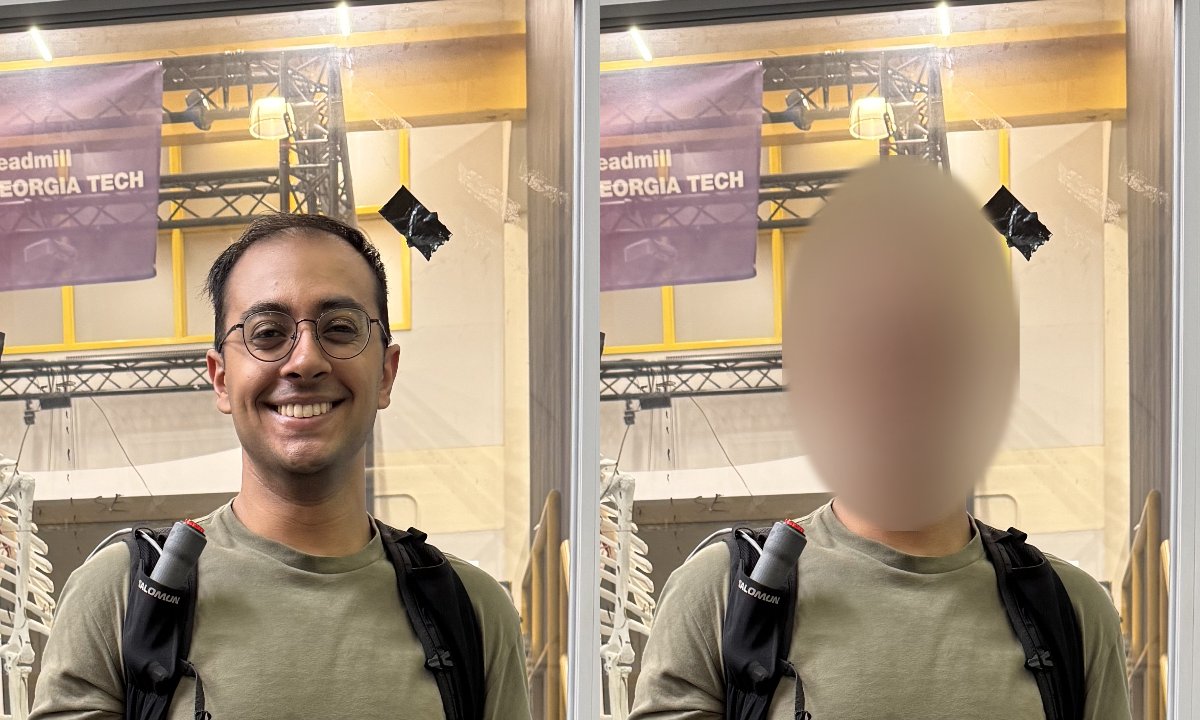 Before and after
dynamo-blur-faces with the default settings
Overview
The dynamo-blur-faces tool finds every face in an image or video and obscures it.
Faces are detected with OpenCV’s YuNet
model, which ships with this package, so nothing is uploaded or downloaded:
everything runs on your machine.
- Photos: faces are detected once and obscured. The output is written with OpenCV, which drops EXIF metadata (including GPS location).
- Videos: every frame is processed. Face boxes are tracked across frames:
- Their position and size are smoothed (
--smoothing) so the blur doesn’t jitter. - When the detector briefly loses a face (motion blur, a turned head), its
last box stays obscured for
--hold_framesframes so the face doesn’t flash through. Ifffmpegis installed, the output is H.264 and keeps the original audio. Without it, the output is a silentmp4vfile.
- Their position and size are smoothed (
GPU Acceleration
By default the tool runs face detection on the CPU with OpenCV. Install the
optional gpu extra to run detection on the GPU through
ONNX Runtime instead:
pip install -e ".[gpu]"
| Platform | Package installed | Backend |
|---|---|---|
| macOS (Apple Silicon) | onnxruntime |
CoreML (Apple GPU) |
| Linux / Windows with an NVIDIA GPU | onnxruntime-gpu[cuda,cudnn] |
CUDA |
With --device auto (the default), the GPU is used whenever it is available.
The first lines of the video output show which backend was chosen, for example
Detector: ONNX Runtime (CoreML). If the GPU backend fails to start (for
example, because the NVIDIA driver is too old), the tool prints a warning and
continues on the CPU.
On Linux, the
[cuda,cudnn]variant installs NVIDIA’s CUDA 12 and cuDNN 9 libraries through pip (a few GB), so no system CUDA toolkit is needed. You only need an NVIDIA driver that supports CUDA 12. Don’t installonnxruntimeandonnxruntime-gpuin the same environment.
Videos are processed as a pipeline: frames are decoded on a background thread,
detected in batches (--batch_size), and obscured in parallel on
--workers CPU threads. The finished frames are streamed straight into
ffmpeg, which encodes them as they arrive.
On an M1 Pro, a 10-second 1080×1920 video takes:
| Setup | Time |
|---|---|
--device cpu |
~12 s |
--device gpu (CoreML) |
~5 s |
The output is identical either way.
Three styles are available:
blur(default): a strong Gaussian blur with feathered edgespixelate: a mosaic of blocksfill: a solid color, the strongest anonymization
Command-Line Usage
dynamo-blur-faces --input <path> [options]
Required Arguments
| Argument | Description |
|---|---|
--input |
Path to the input image or video |
Optional Arguments
| Argument | Default | Description |
|---|---|---|
--output |
Auto | Output path (default: <name>_blurred.<ext>; videos default to .mp4) |
--style |
blur |
blur, pixelate, or fill |
--shape |
ellipse |
ellipse or rect |
--padding |
0.25 |
Fraction to enlarge each face box on every side |
--blur_strength |
0.5 |
(blur) Kernel size as a fraction of face size |
--pixel_blocks |
10 |
(pixelate) Number of blocks across each face |
--fill_color |
black |
(fill) Color name or hex code, e.g. '#eaaa00' |
--score_threshold |
0.6 |
Minimum detection confidence (0–1). Lower it to catch more faces, at the cost of more false positives |
--nms_threshold |
0.3 |
Overlap threshold for merging duplicate detections |
--detect_max_dim |
2048 |
Longest side, in pixels, that frames are downscaled to before detection. Raise it for tiny faces in large photos, lower it for speed, or set 0 for full resolution |
--device |
auto |
auto, gpu, or cpu (see GPU Acceleration) |
--batch_size |
8 |
(video) Frames detected per batch |
--workers |
# cores | (video) CPU threads for detection and blurring |
--smoothing |
0.5 |
(video) Box smoothing between frames, 0–1 (0 = off). Higher values are steadier but lag behind fast motion |
--hold_frames |
5 |
(video) Frames to keep obscuring a face after it is lost |
--start_t |
Start | (video) Trim the output to start this many seconds into the input |
--end_t |
End | (video) Trim the output to end this many seconds into the input |
--no_audio |
false |
(video) Drop the audio track |
--crf |
18 |
(video) H.264 quality; lower is better |
--draw_boxes |
false |
Draw detection boxes and scores instead of obscuring |
--disable_pbar |
false |
Disable the progress bar for videos |
Smoothing never uncovers a face. If a face moves faster than the smoothed box can follow, the box is widened to also cover the face’s current detection. On the example video, the default
0.5cuts box jitter by about 60%.
Face detection is never perfect. Always check the output before sharing it. If a face is missed, run with
--draw_boxesand try a lower--score_thresholdor a higher--detect_max_dim.
Usage Examples
Blur Faces in a Photo
dynamo-blur-faces --input ./example/IMG_5579.jpg
Pixelate Faces in a Video
dynamo-blur-faces --input talk.mp4 --style pixelate --shape rect --output talk_anon.mp4
Blur Only a Clip of a Video
dynamo-blur-faces --input talk.mp4 --start_t 12.5 --end_t 30 --output clip_anon.mp4
Frames outside the range are never decoded, so trimming a short clip out of a long video is proportionally faster. The audio is trimmed to match.
Cover Faces with a Solid Color
dynamo-blur-faces --input photo.jpg --style fill --fill_color '#eaaa00'
Force the CPU
dynamo-blur-faces --input talk.mp4 --device cpu
Check What the Detector Finds
dynamo-blur-faces --input crowd.jpg --draw_boxes --score_threshold 0.4 --detect_max_dim 4096
Python API
import cv2
from dynamo_figures import FaceBlur

blurrer = FaceBlur(style="pixelate", pixel_blocks=8, device="auto")
print(blurrer.device_name)  # e.g. "ONNX Runtime (CoreML)"

# Whole files
blurrer.process_image("photo.jpg", "photo_blurred.jpg")
blurrer.process_video("video.mp4", "video_blurred.mp4", keep_audio=True)
# Or just a slice of it, in seconds
blurrer.process_video("video.mp4", "clip.mp4", start_t=12.5, end_t=30)

# Or step by step on an array
image = cv2.imread("photo.jpg")
faces = blurrer.detect(image)          # [(x, y, w, h, score), ...]
# blurrer.detect_batch([img1, img2])   # same-sized images, one list per image
result = blurrer.apply(image, faces)
See the API Reference for all parameters.
Code Layout
The tool lives in the dynamo_figures.blur_faces package:
| Module | Contents |
|---|---|
core.py |
FaceBlur, the high-level image/video API and video pipeline |
detectors.py |
YuNet detection on the CPU (OpenCV) or GPU (ONNX Runtime) |
tracking.py |
FaceTracker: frame-to-frame smoothing and hold |
obscure.py |
Blur, pixelate, and fill rendering |
video_io.py |
Threaded frame reading and ffmpeg encoding |
cli.py |
The dynamo-blur-faces command (also python -m dynamo_figures.blur_faces) |
models/ |
The bundled YuNet ONNX model |