QR Code
Generate a permanent QR code from a website link, with optional logo embedding, recoloring, and custom colors.
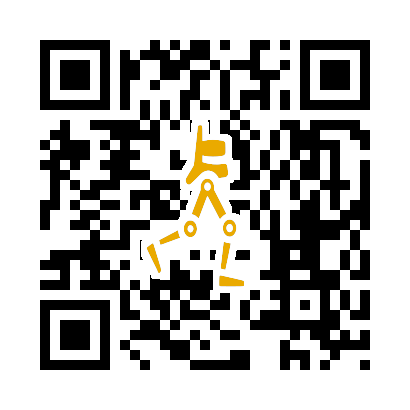 Example QR code with the lab logo integrated and recolored to the lab gold (
#eaaa00)
Overview
The dynamo-qr-code tool turns a URL (or any text) into a QR code image. Because the
link is encoded directly into the image, the code is permanent — it never
expires and keeps working as long as the website is reachable. (QR codes only
“expire” when they point at a URL-shortener that redirects elsewhere; this tool
does no redirection.)
You can optionally embed a logo in the center. Logo embedding relies on QR error
correction: at level H, a code can lose roughly 30% of its area and still
scan. Two embedding styles are available:
badge— the logo is placed on a solid rounded square. Safest, but blanks out a square region, so keep the logo small.integrate— only the modules under the logo’s strokes are cleared (plus a thin halo). For thin line-art logos this uses far less of the error- correction budget, so the logo can be much larger while the QR modules show through around it.
Command-Line Usage
dynamo-qr-code --url <link> [options]
Required Arguments
| Argument | Description |
|---|---|
--url |
The website link (or any text) to encode |
Optional Arguments
| Argument | Type | Default | Description |
|---|---|---|---|
--output |
str |
qr_code.png |
Output image path. The extension sets the format (.png, .jpg, …) |
--box_size |
int |
10 |
Pixels per QR module — controls overall resolution |
--border |
int |
4 |
Quiet-zone width in modules (spec minimum is 4) |
--error_correction |
str |
H |
Error-correction level: L (~7%), M (~15%), Q (~25%), H (~30%). Forced to H when a logo is used |
--fill_color |
str |
black |
Color of the QR modules (any Pillow color: name or hex) |
--back_color |
str |
white |
Background color |
--logo |
str |
None | Path to a logo to center in the code (SVG or raster: PNG/JPG/…) |
--logo_ratio |
float |
0.22 |
Logo width as a fraction of the QR width |
--logo_style |
str |
badge |
badge (logo on a solid square) or integrate (carve only around strokes) |
--logo_padding |
float |
0.0 |
(badge style) Badge padding around the logo, as a fraction of the logo size |
--logo_bg |
str |
white |
(badge style) Badge color behind the logo, or none for no badge |
--logo_halo |
float |
0.04 |
(integrate style) Cleared halo width around the logo strokes, as a fraction of the logo size |
--logo_color |
str |
None | Recolor the logo to a solid color, e.g. #eaaa00 (default: keep original colors) |
--logorequires thecairosvgpackage only for SVG logos. Install it withpip install cairosvgorpip install "dynamo-figures[svg]". Raster logos (PNG/JPG) work without it.
Usage Examples
Basic QR Code
Encode a link with default settings (black on white, no logo):
dynamo-qr-code --url "https://dynamicmobility.github.io/" --output link.png
Embed a Logo (badge style)
Place a logo on a white rounded badge in the center:
dynamo-qr-code --url "https://dynamicmobility.github.io/" \
    --logo lab_icon.svg --logo_ratio 0.25 --logo_padding 0.12 \
    --output link.png
Integrate a Logo (recommended for line-art logos)
Weave the logo into the code so the modules show through around it. This tolerates a larger logo than the badge style:
dynamo-qr-code --url "https://dynamicmobility.github.io/" \
    --logo lab_icon.svg --logo_style integrate --logo_ratio 0.4 \
    --output link.png
Recolor the Logo (lab gold)
Tint the logo to the lab’s gold accent while keeping its shape:
dynamo-qr-code --url "https://dynamicmobility.github.io/" \
    --logo lab_icon.svg --logo_style integrate --logo_ratio 0.4 \
    --logo_color "#eaaa00" --output link.png
Color the QR Code Itself
Make the modules light grey and keep the logo black. --fill_color controls the
QR modules and is independent of --logo_color:
dynamo-qr-code --url "https://dynamicmobility.github.io/" \
    --logo lab_icon.svg --logo_style integrate --logo_ratio 0.4 \
    --fill_color "#999999" --logo_color black --output link.png
Tips for Reliable Scanning
Always test the generated code with a real phone before printing — phone scanners vary, and some are less forgiving than others.
- Keep the logo modest. For
badgestyle stay atlogo_ratio≤ ~0.25; forintegratestyle ≤ ~0.5 works for thin line-art logos. The tool prints a warning if you exceed the safe range. - Leave error correction at
H(the default, and forced whenever a logo is present) so the occluded center is recoverable. - Mind the contrast. Light-grey-on-white modules (e.g.
#cccccc) reduce the contrast scanners rely on. For print, prefer darker greys like#808080or stick with black. - Keep the quiet zone. Don’t reduce
--borderbelow 4.
Python API
You can also use the QRCode class programmatically:
from dynamo_figures import QRCode

# Integrate the lab logo, recolored to gold
qr = QRCode(
    data="https://dynamicmobility.github.io/",
    logo_path="lab_icon.svg",
    logo_style="integrate",
    logo_ratio=0.4,
    logo_color="#eaaa00",
)

qr.save("link.png")
Constructor Parameters
QRCode(
    data,                    # The URL (or text) to encode (required)
    box_size=10,             # Pixels per QR module
    border=4,                # Quiet-zone width in modules (min 4)
    error_correction='H',    # 'L', 'M', 'Q', or 'H' (forced to 'H' with a logo)
    fill_color='black',      # Color of the QR modules
    back_color='white',      # Background color
    logo_path=None,          # Path to a logo (SVG or raster) to center
    logo_ratio=0.22,         # Logo width as a fraction of the QR width
    logo_padding=0.0,        # (badge) badge padding, fraction of logo size
    logo_bg='white',         # (badge) badge color, or None for no badge
    logo_style='badge',      # 'badge' or 'integrate'
    logo_halo=0.04,          # (integrate) halo width, fraction of logo size
    logo_color=None,         # Recolor logo to a solid color, e.g. '#eaaa00'
)
Methods
| Method | Returns | Description |
|---|---|---|
make_image() |
PIL.Image |
Build and return the QR code as a Pillow image |
save(output_path) |
str |
Generate the QR code and save it to output_path |
Dependencies
The dynamo-qr-code tool requires qrcode (and Pillow, already a core dependency):
pip install qrcode
SVG logos additionally require cairosvg:
pip install "dynamo-figures[svg]"
qrcodeandPilloware installed automatically with thedynamo-figurespackage.cairosvgis an optional extra needed only for SVG logos.
Supported Formats
Logo Input Formats
- SVG (
.svg) — rasterized viacairosvg - PNG, JPG, and other raster formats supported by Pillow
Output Formats
Any format Pillow can write, chosen by the output file extension:
- PNG (
.png) — recommended (lossless, supports transparency) - JPEG (
.jpg,.jpeg) — flattened onto the background color